
NIU
NIU TechnologiesAuto & Vehicles
3.5275.00 Reviews
- Version
- 5.12.2
- Installs
- 100.00K
- Age Rating
- Everyone
Screenshots
Our Review of NIU
 Analysis by Appyee
When a scooter is used by more than one person in a household, the practical question is not only where it is parked or who has the key. It is also whether everyone can check its condition without guessing. That is where NIU fits. Developed by NIU Technologies, this free Auto & Vehicles app is designed to monitor the status of a compatible NIU scooter from a phone.
I see it as a companion rather than a complete replacement for the scooter’s physical controls. It is most useful when I want a quick view before leaving home, when another person needs to know whether the scooter is ready, or when I am trying to avoid discovering a low battery at the worst possible moment. The app has a 3.5 average from around 4,100 ratings and has passed 100,000 installs, so it is clearly being used by a real group of scooter owners, even though the experience is not universally smooth.
Using one scooter across a household
A shared scooter creates small coordination problems that are easy to underestimate. One person may assume it was charged after the last trip, while another is already on the way out. Someone may want to check its status from indoors, and a different rider may be more interested in whether the vehicle is ready for a short commute. A status-monitoring app can remove some of that uncertainty, provided each person understands what the app is showing and what still needs to be checked on the scooter itself.
In my view, the strongest household use is the simple pre-trip check. Imagine that I need to leave for work while another member of the household used the scooter the evening before. Instead of relying on memory, I can open the app and review the scooter’s current information before putting on my helmet. That does not eliminate every possible problem, but it changes the routine from assumption to preparation.
The same workflow helps when the scooter is parked outside or in a shared garage. I do not have to walk over just to find out whether checking it is worthwhile. For a person who rides regularly, that small saving of effort becomes more valuable than it sounds. The app is not trying to be a broad travel planner or a general vehicle marketplace; its purpose is narrower, and that focus is useful when the immediate question is simply, “What is the scooter’s status?”
There is also a communication benefit. If two people use the same scooter, one person can report what they saw in the app before the other heads out. That is more dependable than a vague message such as “I think it has enough charge.” Still, I would not treat the phone view as permission to skip a physical inspection. Tires, visible damage, lights, and the surrounding parking area remain things I would check directly.
What the app is good at before a ride
The best habit is to make the app part of a short departure routine instead of opening it randomly. I would check the scooter status, confirm that the information appears current, and then look at the vehicle itself. If the app and the scooter seem out of step, the physical scooter should win as the immediate source for safety decisions.
A useful, less obvious approach is to use the app as a handover tool. When I finish a ride, I can check the status and tell the next rider what to expect rather than leaving the scooter with no context. This is especially helpful in a household where different people make different assumptions about charging or short trips. The app does not solve the household agreement by itself, but it gives that agreement a shared reference point.
Another practical trade-off is convenience versus attention. Because the app makes checking easy, it may encourage a rider to focus too heavily on the phone display. I would keep the check brief and do it while stationary. The value comes from reducing uncertainty, not from turning every departure into a screen session.
Setting expectations around access
Before several people rely on the app, I would decide who is expected to use it and what each person is allowed to do with the scooter. The app should not be treated as a substitute for a household rule about keys, charging, parking, or reporting problems. Those boundaries matter more when the scooter is shared between people with different riding experience.
I would also avoid assuming that installing the app on several phones automatically creates a perfect shared setup. Account access, scooter pairing, and the way the app handles more than one user should be tested with the actual household arrangement. Rather than guessing, I would begin with the primary rider’s phone, confirm that the scooter appears correctly, and then establish how another regular rider will check the same vehicle.
This is one area where the app may feel less flexible than a general smart-home dashboard. A household platform is often built around multiple users and shared devices, while a vehicle companion tends to revolve around the scooter and its owner. That does not make NIU a poor choice, but it means the household should agree on a primary account boundary instead of treating every phone as interchangeable.
If the scooter belongs to one person but is occasionally borrowed, I would be careful about sharing complete account access casually. A borrower may only need instructions and a physical key, not permanent access to the owner’s connected vehicle information. The right arrangement depends on trust and the way the scooter is managed, but the app should be included in that conversation before someone assumes access is automatic.
Keeping coordination simple
For everyday coordination, I would use one clear routine: the person who finishes with the scooter reports anything unusual, and the next rider checks the app before leaving. That is more realistic than expecting everyone to monitor the scooter constantly. The app works best when it supports a small household process rather than becoming another source of notifications and confusion.
When the status does not match what I expect, I would first check the basics: whether I am viewing the intended scooter, whether the phone has a reliable connection, and whether the vehicle itself is accessible for a direct check. I would not immediately assume that a surprising display means the scooter is damaged. At the same time, I would not dismiss a warning simply because the previous rider said everything was fine.
This creates a useful division of responsibility. The app can provide a convenient remote view, while the rider remains responsible for confirming that the scooter is safe and ready. That distinction is particularly important in a shared household because the person reading the status may not be the person who last rode or charged the vehicle.
I also like the possibility of using the app to settle small disagreements without turning them into arguments. If one person says the scooter was ready and another finds a different condition, the status view gives the household a starting point for checking what happened. It is not a full history lesson, and I would not invent a detailed record from it, but it can make the handover more concrete.
Trust, age, and the household decision
I’d use this section to decide whether the app belongs in your household routine, not just whether its age label looks reassuring. NIU is rated Everyone, but scooter access still calls for adult judgment about who rides, who manages the account, and how status information is used. The next step is to set boundaries that keep shared access clear without making a simple vehicle check feel like a family-wide project.
Who should use it
NIU is aimed at scooter owners who want a connected way to monitor their vehicle. I think it is a good fit for a regular rider who already owns a compatible NIU scooter and wants more convenience than the scooter alone provides. It is also useful for a household where one person handles charging or storage while another person does most of the riding.
The app is marked for Everyone, but that label should not be confused with independent scooter access for every age group. A younger household member may be able to understand the app, yet still need an adult to set boundaries around riding, charging, parking, and account use. The application can show vehicle information; it does not replace supervision, judgment, or local riding rules.
For teenagers, I would treat the app as part of a trust arrangement rather than as a monitoring solution. The household should decide who owns the account, who can use the scooter, and what must be reported after a ride. Since the app’s purpose is vehicle status, I would not present it as a dedicated child-safety system or assume it provides family-management controls.
For older relatives or occasional riders, the main question is simplicity. If someone only rides once in a while, the app may add a step they do not need. In that case, a clear verbal handover and a direct scooter check may be easier. The app becomes more worthwhile when the person wants to prepare before walking to the vehicle or regularly shares responsibility with another rider.
Boundaries that prevent confusion
My preferred household arrangement would have one person responsible for the account and the scooter’s connected setup, while regular riders know how to perform a basic status check. That keeps troubleshooting from becoming a group project. If the app stops showing useful information, the primary account holder has a clear role in checking the connection and deciding what to do next.
I would also keep the phone boundary practical. A person borrowing the scooter for one afternoon does not necessarily need the app installed. A long-term household rider may benefit from access, but that should be agreed in advance. This avoids a common mistake with connected products: confusing convenience with a requirement that every user have identical access.
Another tip is to agree on what counts as a problem. A low battery, an unexpected status, or a scooter that was moved can each require a different response. If the household has no agreed action, the app may simply produce more messages without improving coordination. A short rule such as “check the scooter directly and tell the primary rider” is often more useful than trying to interpret every detail remotely.
Where alternatives may be better
The usual alternative is to rely on the scooter’s own display and physical inspection. That method is immediate and does not require a phone, which makes it better for a person who rides rarely or dislikes connected apps. It also keeps the pre-ride routine straightforward. The weakness is that it requires being beside the scooter, and it offers less convenience when another household member wants information from a distance.
A general vehicle-management app may be more attractive to someone who owns several brands or wants one place for multiple types of transport. However, a brand-specific companion such as NIU is more naturally connected to the NIU scooter experience. If the household has only a compatible NIU vehicle, using the manufacturer’s app is more sensible than adding a broad platform that may not understand the scooter as directly.
For a rider whose main need is navigation, route planning, or traffic information, a mapping app is the better tool. NIU should not be chosen because it might replace those services. Its value is in checking the scooter, not in becoming the central app for every part of a journey.
Likewise, someone who expects advanced household administration may find the experience too limited. If the priority is detailed multi-user permissions, extensive family controls, or a unified dashboard for many smart devices, a dedicated household platform may offer a better structure. I would choose NIU when the scooter itself is the center of the problem, not when the goal is to manage an entire connected home.
Installation and everyday friction
The app is free, which makes trying it a low-risk decision for an owner of a compatible NIU scooter. It supports devices running Android 8.0 or later, so the phone’s operating system is worth checking before installation. The current version is 5.12.2, and the application has been available since August 18, 2016, giving it a longer presence than a newly launched companion tool.
That history is reassuring in one sense, but an established app can still feel uneven across different phones, scooter configurations, and connection conditions. I would judge it by a real test at home and at the usual parking place rather than by the installation alone. The important question is whether the status is consistently useful in the places where the household actually needs it.
One friction point is psychological rather than technical: remote information can feel more certain than it really is. I would teach every regular rider to distinguish between checking status and confirming road readiness. That small explanation prevents the app from being blamed for conditions it was never meant to replace, such as a blocked path, a damaged tire, or an unsafe parking position.
Another practical tip is to avoid making the app the only record of a handover. If the scooter is shared, a short message about unusual behavior is still valuable. The app can tell the next rider what the vehicle status looks like, while the outgoing rider can explain context that a status screen may not communicate clearly.
My household verdict
I recommend NIU to owners who want a convenient status check for their NIU scooter and who are willing to keep the app in its proper role. The strongest case is a shared household with regular riders, predictable routines, and a genuine need to know whether the scooter is ready before walking outside. In that setting, the app can reduce avoidable misunderstandings and make handovers calmer.
I would skip it if I did not own a compatible NIU scooter, if I only rode occasionally, or if I expected a complete family-management system. I would also choose a broader vehicle app when managing several unrelated brands is more important than having a manufacturer-focused companion. For some riders, the scooter’s own controls and a quick physical inspection will remain simpler.
My final view is that NIU earns its place through focused usefulness rather than breadth. It turns a shared scooter from something everyone has to guess about into something the household can check before acting. That is a modest benefit, but a real one. Use it alongside sensible account boundaries, direct safety checks, and clear communication, and it becomes a practical part of owning a connected scooter rather than another app installed and forgotten.
Verdict
Strengths of NIU
- Simple interface makes browsing local services quick and convenient.
- Useful for discovering nearby businesses, offers, and everyday services.
- Search and category tools help narrow down relevant local results.
- Can save time by comparing available options in one place.
- Regular updates may add new listings, features, and local deals.
Limitations of NIU
- Coverage and listing quality may vary considerably by location.
- Some businesses or services may have incomplete information.
- The app may require location access for its main features.
- Offers and availability can change without much notice.
- Performance may depend on internet quality and device compatibility.
Similar Picks in This Category
View All
Android Auto
Google LLC4.1

maxim — order a taxi & food
PT. SITO4.7

Штрафы ГИБДД: проверка с фото
Pays LLC – Штрафы ГИБДД4.7

Номерограм – проверка авто
Авто Ассист4.8

Дром Авто
Дром4.9

Frequently Asked Questions
What is NIU, and what can I use it for?
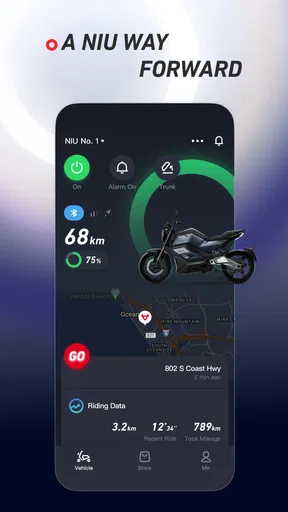
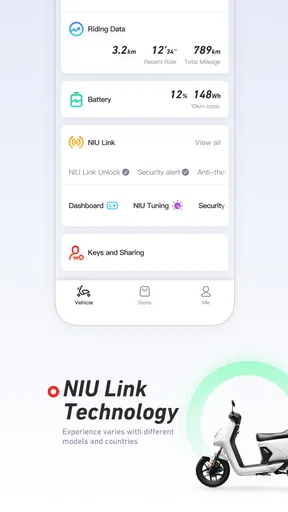
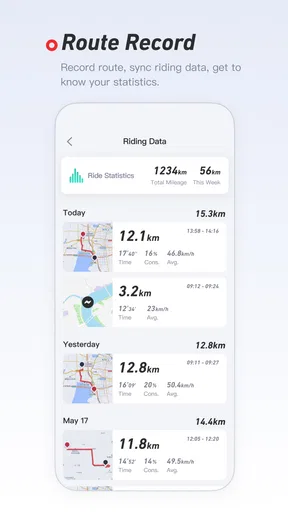
NIU is a mobility app designed to help users interact with NIU electric scooters and other compatible vehicles. Depending on the model and region, the app can show battery level, estimated range, riding statistics, vehicle location, trip history, and maintenance information. It may also support remote features such as locking, unlocking, alarms, firmware updates, and locating the scooter. Available functions can vary by vehicle, country, and account type.
Is the NIU app compatible with every NIU electric scooter?
Compatibility depends on the specific NIU vehicle, model year, market, and app version. Most connected NIU scooters are intended to work with the official application, but some older models or region-specific versions may offer fewer features or require a particular connection method. Before downloading, check the app listing and NIU’s official compatibility information. You may also need the scooter’s frame or vehicle identification details to complete pairing.
How do I connect my NIU scooter to the app?
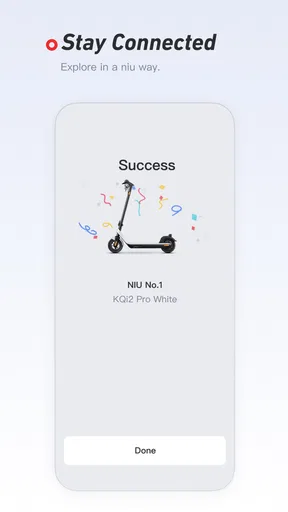
After installing NIU, create or sign in to your account and allow the requested permissions, such as Bluetooth and location access. Add your vehicle by following the in-app instructions, then enter or scan the required identification information. Keep the scooter nearby and powered on during pairing. If connection fails, make sure Bluetooth is enabled, the vehicle is not linked to another account, and both the app and scooter firmware are up to date.
Does NIU track my location or collect personal data?
The app may collect account details, vehicle information, diagnostic data, riding statistics, and location-related information when connected features are enabled. Location access can be used for navigation, vehicle finding, trip records, or security functions, depending on your model and settings. Review the privacy policy and permission controls before using the service. Some features may not work correctly if location, Bluetooth, mobile data, or notification permissions are disabled.
Is NIU free to download, and are there any extra costs?
NIU is generally available as a free download, although mobile data charges may apply when the app communicates with your scooter away from Wi-Fi. The application itself does not replace the purchase, registration, insurance, servicing, or charging costs associated with owning an electric vehicle. Certain connected services, subscriptions, regional features, or dealer-supported services may differ by market. Check the current App Store or Google Play listing for the latest conditions.
